
Protected on public Wi-Fi
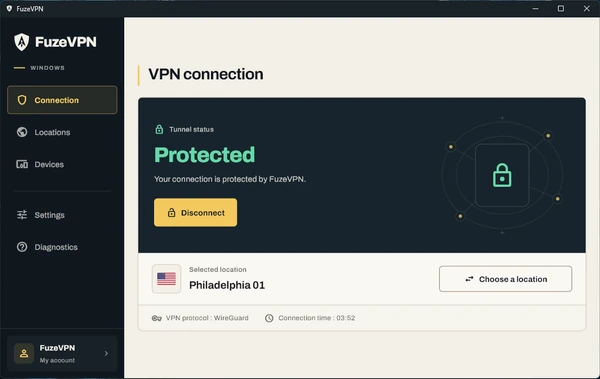
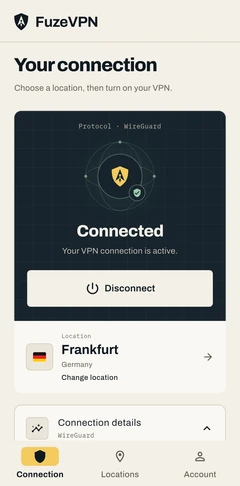
At a café, in a hotel or on the move, the Windows and Android apps encrypt your device’s whole connection.
Choose language
Windows · Android · iPhone · Mac · Linux
Black Friday · until 6 December
On public Wi-Fi or at home, FuzeVPN encrypts your connection and hides your IP address from the sites you visit. Windows and Android apps, browser extensions, and iPhone, iPad, Mac or Linux with a WireGuard or OpenVPN file.
FuzeVPN
At a café, in a hotel or on the move, the Windows and Android apps encrypt your device’s whole connection.
FuzeVPN doesn’t store the sites you visit through the VPN.
With the Windows and Android apps, the Wi-Fi network and your internet provider can no longer see the sites you open.
With FuzeVPN connected on your device, the Wi-Fi network and your internet provider see only an encrypted connection to our server, and sites see the server’s address, not yours.
Protect my connection — from €1Included in both plans
The same protection in both plans, on up to 5 devices.
The Windows and Android apps encrypt the device’s whole connection: public Wi-Fi and your internet provider can no longer see the sites you open.
Explore the Windows appSites see the VPN server’s address, not yours, so your real location stays private.
App or extension: what is protectedFor you and your household: Windows, Android, Chrome, Edge, Firefox, Brave, and iPhone, iPad, Mac or Linux with a configuration file. A compatible router protects your whole network, or only the devices you choose, and counts as a single device.
View platformsClear pricing
Same features, same 5 devices, same price at renewal: only the length changes. The plan you pick here is preselected at checkout.
Best value · 12 months for the price of 10
Black Friday · 15 months for the price of 10
One payment
€10for 12 months+ 3 free months
That works out to about €0.83 per month.
15 months in total: 12 months paid and 3 free months.
Until 6 December 2026, 11:59 pm (Paris time): 3 free months with the annual plan, that is 15 months for €10. Applied automatically at checkout, with no code. Renewal, if you turn it on: €10 for 12 months. Offer terms
No commitment
€1per month
Subscribe — €1/monthFull refund on request within 30 days of your first payment, without giving a reason. Request it in one click from Subscription in your customer area, or by email.
Automatic renewal is optional. You choose it at checkout and can turn it off at any time from your account. The price stays the same.
Pay by card through SumUp. Apple Pay, Google Pay and local payment methods are also available through PayPal.
Card via SumUp, or PayPal, which also lets you pay with Apple Pay and with local payment methods such as Trustly in the UK; automatic renewal is by card or PayPal. Google Pay is also accepted, both with card payment and with PayPal. With Apple Pay or a local payment method via PayPal, automatic renewal is available when offered at checkout. Google Pay supports automatic renewal through PayPal; through SumUp, it is for one-period payments. In the Android app, you can also subscribe through Google Play, at the price shown in Google Play, taxes included, which may differ from our prices. A first subscription through Google Play starts with a 14-day free trial; it then becomes paid unless you cancel it in Google Play before the trial ends.
Every price comes from the provider’s official pricing page, checked on the date shown below.
Compare prices, published code and supported uses.
Initial-period prices: Prices recorded for France, including VAT where it applies. Official websites checked on . Prices, promotions and renewal terms may change. Check the provider’s offer before purchasing.
| Criterion | FuzeVPN€1/month or €10 for 12 months | NordVPNBasic | SurfsharkStarter | Proton VPNVPN Plus | ExpressVPNBasic |
|---|---|---|---|---|---|
| Price | €1 / monthVAT not applicable — Article 293 B of the French General Tax Code (CGI) | €17.99 incl. VAT / month€14.99 excl. VAT / month | €22.74 incl. VAT / month€18.95 excl. VAT / month | €9.99 incl. VAT / month€8.33 excl. VAT / month | €15.59 incl. VAT / month€12.99 excl. VAT / month |
| Renewal price | €1 / month | €17.99 incl. VAT / month (opens in a new tab)€14.99 excl. VAT / monthVAT may be added | €22.74 incl. VAT / month (opens in a new tab)€18.95 excl. VAT / monthVAT may be added | €9.99 incl. VAT / month (opens in a new tab)€8.33 excl. VAT / monthVAT may be added | €15.59 incl. VAT / month (opens in a new tab)€12.99 excl. VAT / monthVAT may be added |
| All apps open source | Yes | No | No | Yes | No |
| 4K streaming | Yes | Yes | Yes | Yes | Yes |
| Torrenting (P2P) | YesTorrenting available in select locations | Yes | Yes | Yes | Yes |
| Company’s country | France | Panama | Netherlands | Switzerland | British Virgin Islands |
Switch VPNs
Stop paying top price at renewal: with FuzeVPN, you pay the same price at every renewal.
On your devices
Windows and Android, four browser extensions, and a file for iPhone, iPad, Mac, Linux, router or box: choose the version that fits your devices.
App for Windows 10 and 11
It protects the whole connection of your Windows PC, browsers and other software included. Protection if the connection drops (kill switch) is on by default.
App for Android 8.0 or later
It protects the whole connection of your Android phone or tablet, and that of your Chromebook. It works with Android’s “Always-on VPN” and “Block connections without VPN” for continuous protection.
WireGuard or OpenVPN file
Choose its name, protocol and server in your customer area, then create and download it in one click: import it into the official WireGuard or OpenVPN Connect app on iPhone, iPad and Mac, or into the network settings or with the nmcli command on Linux, depending on your system. No FuzeVPN login to enter: the whole device goes through FuzeVPN.
Extension for Chrome, Edge, Firefox or Brave
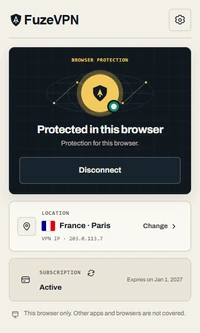
It protects browsing in the browser where it is installed, Mac and Linux included, with protection if the connection drops on by default. Each extension counts as one device.
The FuzeVPN network
€1 a month.Choose my plan
 United StatesPhiladelphia
 BrazilSão Paulo
 United KingdomGloucester
 FranceGravelines
 GermanyFrankfurt
 PolandWarsaw
 MoldovaChișinău
 Singapore
 Hong Kong
The list will update as soon as the network responds.
Before you decide
See what FuzeVPN protects, how data is used and who runs the service.
With FuzeVPN, the Windows or Android app protects the whole device, a configuration file protects iPhone, iPad, Mac, Linux and your router, the extension protects its browser, we don’t store your browsing history and automatic renewal is optional.
FuzeVPN does not retain your VPN browsing history. Data needed for your account, payments and the operation of the service is explained separately.
FuzeVPN is operated in France. Find the operator’s identity, contact details and hosting information.
The code we develop for our Windows and Android apps and our browser extensions is published on GitHub under MPL-2.0. View the source code and licenses.
Frequently asked questions
It’s the regular price, not a promotion: no struck-through price and no two-year commitment. Our setup is lean: a small independent business registered in France, with 9 locations on servers rented from hosting providers such as OVH and IONOS. Your subscription funds the service: we do not sell your data and don’t store browsing history.
What we keep, and what we don’tUse the FuzeVPN app on Windows or Android. On Chrome, Edge, Firefox and Brave, install the browser extension. The app protects your other apps; the extension is limited to its browser. On iPhone, iPad, Mac, Linux, a router or an internet box, use a WireGuard or OpenVPN configuration file.
See all appsYes. On iPhone, iPad and Mac, create a WireGuard or OpenVPN configuration file in your customer area and import it into the official WireGuard or OpenVPN Connect app: the whole device goes through FuzeVPN. On Linux, create the same file in your customer area and import it into the network settings or with the nmcli command, depending on your system. On Mac and Linux, the Chrome, Edge, Firefox or Brave extension also protects your browsing. On Chromebook, the Android app protects the whole device, and the Chrome extension your browsing. FuzeVPN apps for iPhone / iPad and Mac, and a Safari extension, are planned for early 2027, included in your subscription at no extra cost.
iPhone, iPad and MacNo. An extension protects only its browser. For your other apps, use the Windows or Android app, or a WireGuard or OpenVPN configuration file on Mac or Linux, included in the same subscription.
Use FuzeVPN with a WireGuard or OpenVPN file9 locations. Check the available locations; the country shown is the country of the exit IP address. Each VPN server is physically located in the city and country shown.
See the locationsFuzeVPN does not store the sites you visit or your DNS history. Account, device and payment data is still needed to provide the service. Some of our hosting and network providers keep their own platform logs.
Data and how it is usedOnly the billing period differs: you pay €1 for one month or €10 in one payment for twelve months. The features are the same, with guaranteed very high speed per device in each direction, enough for 4K streaming on your platforms.
Compare the plansCard and PayPal, for both the monthly and the annual plan. Google Pay is also accepted, both with card payment and with PayPal. Thanks to PayPal, you can also pay with Apple Pay or a local payment method: Trustly in the UK and many European countries, iDEAL in the Netherlands, Bancontact in Belgium, BLIK and Przelewy24 in Poland, EPS in Austria, Swish in Sweden, Skrill, or a transfer from an Indonesian or Latvian bank. No card? Pay with PayPal. Your card details are entered in our payment provider’s secure interface, and FuzeVPN stores neither full card numbers nor security codes. In the Android app, you can also subscribe through Google Play: the price, taxes included, is the one shown in Google Play and may differ from our prices; a first subscription through Google Play starts with a 14-day free trial. That subscription is managed in Google Play.
Terms of sale and useNo, it is optional: with a card or PayPal, for both the monthly and the annual plan, you choose at checkout whether to enable it (a Google Play subscription renews until you cancel it in Google Play). It renews at the same price, and payment is taken on the renewal date. You can stop it anytime from your customer area; to avoid being charged, do so before that date. Access remains valid until the end of the paid period.
Cancellation detailsYes, in two ways. On our website, subscribe and try FuzeVPN on all your devices: if it isn’t right for you, request a full refund within 30 days of your first payment by card or PayPal, without giving a reason. On Android, a first subscription taken out in the app through Google Play starts with a 14-day free trial; the subscription then becomes paid unless you cancel it in Google Play before the trial ends.
See the guaranteeRequest a refund in one click from Subscription in your customer area, or by email. You can request it within 30 days of your first payment by card or PayPal, once per account. The refund is issued at once to the payment method you used; depending on your bank, it usually appears within 72 hours. The refund ends the access linked to that payment. For a card payment processed by SumUp, the refund immediately ends your subscription and VPN access, including a period added by a plan change. With PayPal, a later period already paid for remains available until its end. A Google Play subscription follows Google Play’s refund rules. This guarantee is in addition to the statutory 14-day right of withdrawal, explained in the Terms of sale and use. For your first payment, click “Request refund” in the Subscription section of your customer area: this refund is your withdrawal.
How to request a refundWith the link or code of a friend who is already a customer, the annual plan gives you 15 months for €10 instead of 12, from the moment you pay. You enter the code on the payment page, for an account’s first purchase. Your friend also gets 3 free months, 30 days after your payment. Renewal, if turned on, is then at €10 for 12 months. Already a customer? Refer your friends from the Referral section of your customer area, with no limit: for each one, 3 free months for them and 3 months for you.
Black Friday, until 6 December: the annual plan already gives 15 months for €10, with or without a code. If you pay with a friend’s code or link, they still get their 3 free months.
See the referral offerYes, in locations marked “P2P”, using the FuzeVPN app for Windows or Android, or a configuration file. In the locations list, use the “P2P” button next to “Favorites” to show supported locations. P2P use must comply with the law and the service terms. A browser extension does not protect your torrent software.
Terms of sale and useSign in with the same account. You’ll see your subscription status and everything you can do with it. If a payment is pending, open Subscription in your customer area. Use “Check payment status” when that button is shown to refresh the result before trying again.
Sign in€1 for one month or €10 for 12 months, for up to 5 devices.
€1 per month€10 for 12 months15 months for €10 until 6 December
Choose my plan